This article focuses on unified multi-model access and the AI visual delivery pipeline: using a vector engine to centrally manage API keys, route GPT Image 2, DeepSeek V4, and GPT-5.5, and combine Lovart with layered PSD export to solve the core pain point of AI images that can be generated but are difficult to edit. Keywords: multi-model gateway, layered PSD, API key management.
Technical Specifications at a Glance
| Parameter | Details |
|---|---|
| Core Language | Python / HTTP API |
| Integration Protocol | OpenAI-compatible interface, REST |
| Article Focus | Unified multi-model access and AI design workflows |
| Models Covered | GPT Image 2, DeepSeek V4 Flash, DeepSeek V4 Pro, GPT-5.5 |
| Visual Tools | Lovart, Photoshop |
| Core Dependencies | OpenAI SDK-compatible client, image generation API, PSD editing workflow |
| Common Pain Points | API key sprawl, fragmented interfaces, AI images that are hard to edit later |
| Typical Use Cases | Technical illustrations, e-commerce posters, internal enterprise AI systems |
This Workflow Turns AI from a Chat Tool into a Production Tool
When developers talk about AI today, the focus has shifted from whether a model is smart enough to whether it can fit into a business workflow. Writing code, generating long-form documents, and creating images are no longer enough. The real question is whether those capabilities can be integrated reliably, managed centrally, and reused at low cost.
The core value here is not any single model. It is the complete delivery chain: a language model understands the task, an image model generates the first draft, a design tool separates the layers, and professional software completes the final deliverable.
The GPT Image 2, Lovart, and PSD Combination Solves the Editability Problem
The biggest problem with most AI image generation is not that the output looks bad. It is that the output is hard to modify afterward. Real business requirements do not stop at generating a visually appealing image. Teams need movable headlines, replaceable backgrounds, scalable subjects, and rearrangeable selling points.
 AI Visual Insight: This image illustrates how AI capabilities are moving from isolated generation tasks to orchestrated workflows. It emphasizes the chained relationship between image generation, element decomposition, and file delivery, making it a strong visual anchor for the theme of moving from model capability to production systems.
from openai import OpenAI

# Initialize an OpenAI-compatible client
client = OpenAI(
    api_key="YOUR_VECTOR_ENGINE_KEY",  # Use the key issued by the gateway
    base_url="https://your-gateway.example.com/v1"  # Point to the unified gateway endpoint
)

# Send a text model request
resp = client.chat.completions.create(
    model="gpt-5.5",  # Choose the model based on the task
    messages=[{"role": "user", "content": "Generate an e-commerce poster requirements brief for me"}],
    temperature=0.4
)

print(resp.choices[0].message.content)  # Output the generated result
This code shows how a unified gateway can replace direct connections to multiple individual model endpoints.
Editable Design Assets Matter More than One-Off Image Output
What design teams really need are assets that can be modified, reused, and delivered, not a one-time PNG. Lovart becomes valuable because it can decompose a flat image generated by GPT Image 2 into structured elements such as the subject, background, text area, and decorative area.
That means AI-generated imagery is no longer just a final screenshot. It starts to move toward the editing semantics of professional design software. Even if the layer separation is not 100% perfect, extracting 60% to 80% of the key structure already reduces rework significantly.
The Value of a Vector Engine Lies in Providing a Unified Entry Point, Not Replacing Models
In the multi-model era, the part that usually gets out of control is not the invocation itself. It is the keys, billing, routing, and logs. One day you integrate GPT-5.5, the next day GPT Image 2, and later you test DeepSeek V4. Very quickly, the system turns into a mix of multiple SDKs, duplicated configuration files, and separate billing streams.
A gateway such as a vector engine should act as a unified invocation layer that abstracts multi-model capabilities. It does not replace the models. It makes them consumable in an engineering-friendly way.
# Route models based on task type
TASK_TO_MODEL = {
    "copywriting": "deepseek-v4-flash",   # High-frequency, low-cost tasks
    "analysis": "deepseek-v4-pro",        # Complex reasoning tasks
    "image": "gpt-image-2",               # Image generation tasks
    "strategy": "gpt-5.5"                 # High-quality comprehensive output
}

def pick_model(task_type: str) -> str:
    return TASK_TO_MODEL.get(task_type, "gpt-5.5")  # Default to the high-quality model
This code demonstrates the most basic routing strategy in a multi-model gateway.
A Practical Image-to-PSD Delivery Workflow Should Be Templated
The first step is to write prompts that look like design requirement briefs, not vague one-line descriptions. You should specify the subject, background, title area, selling-point cards, aspect ratio, style, and whitespace rules.
The second step is to perform element editing and automatic layer separation in Lovart. The goal here is not to expect one-click perfection. The goal is to quickly obtain workable layers and create better conditions for follow-up refinement.
The third step is to export a PSD and move into Photoshop. At that point, a designer can replace brand fonts, rearrange titles, adjust subject size, and output multiple size variants to complete real commercial delivery.
Developers Should Solve API Key and base_url Governance First
API keys should not be hardcoded into the frontend, and test and production environments should not share the same credentials. A mature approach is to isolate keys by project, environment, and task type, while pointing base_url to a unified gateway so you can support auditing, rate limiting, and model replacement later.
import os
from openai import OpenAI

# Read the key from environment variables to avoid hardcoding it in the repository
client = OpenAI(
    api_key=os.getenv("VECTOR_ENGINE_API_KEY"),  # In production, inject this through a secret management service
    base_url=os.getenv("VECTOR_ENGINE_BASE_URL")
)

def generate_image_prompt(topic: str) -> str:
    # Build a structured prompt to improve image editability
    return f"Generate a technical poster about {topic}, including a title area, subject area, data flow icons, and whitespace for buttons."
This code shows that secure integration and prompt templating can advance together.
This Delivery Chain Fits Three High-Frequency Business Scenarios Best
The first scenario is technical content production. Article covers, architecture diagrams, flowcharts, and model comparison graphics all need information clarity rather than pure visual impact. GPT Image 2 is better suited for generating structured informational graphics.
The second scenario is e-commerce and marketing. E-commerce teams have high request volume, fragmented size requirements, and frequent revisions. Layered PSD output significantly reduces the waste of rebuilding an entire image from scratch.
The third scenario is internal enterprise AI systems. Customer support, knowledge bases, operations dashboards, and content platforms all benefit from a unified model access layer. Without it, invocation logic quickly becomes unmanageable as the business grows.
The Current Limitations Must Be Stated Clearly
First, text layers in exported PSD files are not guaranteed to remain truly editable text, so important headlines should still be manually rearranged when needed. Second, transparent materials, shadows, and character edges in complex scenes may not separate accurately into layers. Third, advertising, e-commerce, healthcare, and finance workflows must retain human review.
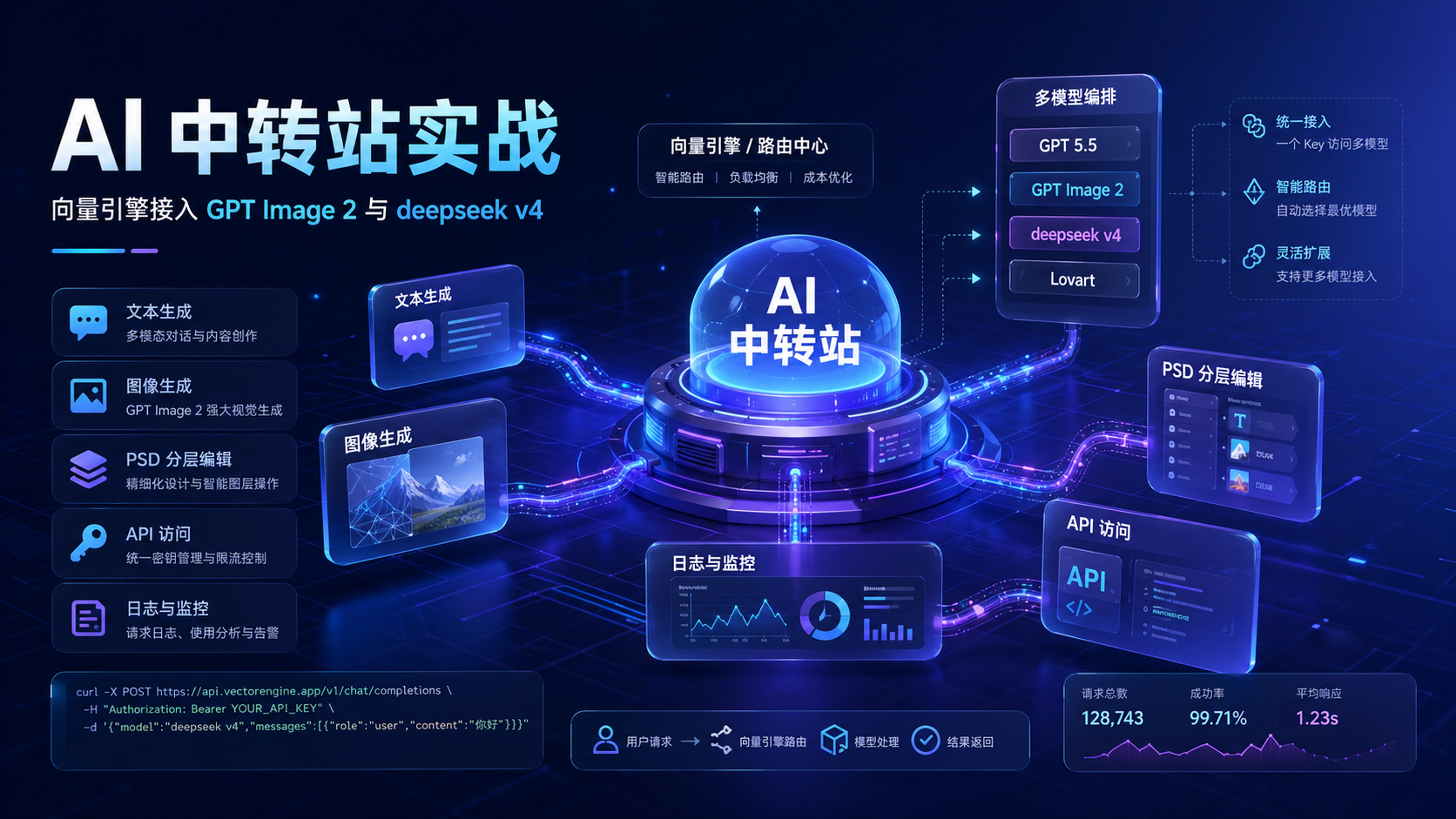 AI Visual Insight: This image works well as a closing visual for the theme of moving from generation to delivery. It highlights that AI output must continue into design software, review pipelines, and business systems instead of stopping at a one-off generated image.
The Best Team-Level Practice Is to Isolate the Model Invocation Layer
Do not scatter model names across business code, and do not let every business line maintain its own SDK wrapper. A better approach is to establish a unified model service layer. Business applications should only submit the task type and input data, while the middle layer handles routing, retries, logging, and cost tracking.
Once that layer becomes stable, the team can upgrade AI from a tool that only certain individuals know how to use into a reusable organizational capability. That is also the most important conclusion worth preserving: the next step for AI is not simply better generation, but better delivery.
FAQ
Q: Why not call each model provider’s official API directly?
A: Direct integration works for small-scale experiments. But once you move into team collaboration, you quickly run into API key sprawl, inconsistent interfaces, fragmented logs, and billing that is hard to reconcile. A unified gateway is a better fit for production environments.
Q: Can PSD files exported from Lovart completely replace manual work by designers?
A: No. Lovart is better understood as a high-efficiency preprocessing tool. It can handle large structural decomposition, but text rearrangement, detail cleanup, brand compliance, and commercial aesthetics still require a designer’s judgment.
Q: What should developers do first when integrating this kind of workflow?
A: Start by abstracting the model invocation layer. Then implement API key management, base_url standardization, log tracing, and retry handling. Getting a demo to run is not the finish line. Observability and maintainability determine whether the system can run for the long term.
Core Summary: This article reconstructs a multi-model integration and AI visual production workflow: use a vector engine to centrally manage API keys and model routing, use GPT Image 2 to generate the initial visual draft, use Lovart to separate elements and export a PSD, and finally move into Photoshop for refinement. The result helps developers and design teams move AI from a demo tool to a reusable, deliverable production system.