The hardest part of JMeter API testing is usually not sending requests. It is handling authentication and variable scope. This article focuses on three authentication mechanisms—Cookie, Session, and Token—and explains how they work, how to configure them in JMeter, and how to share Tokens and Cookies across thread groups. Keywords: JMeter, API authentication, cross-thread group variable sharing.
Technical Specification Snapshot
| Parameter | Description |
|---|---|
| Tool | Apache JMeter |
| Applicable Scenarios | API testing, login state validation, performance test setup flows |
| Related Protocols | HTTP / HTTPS |
| Core Components | HTTP Cookie Manager, HTTP Header Manager, JSON Extractor, BeanShell PostProcessor |
| Authentication Types | Cookie, Session, Token |
| Key Capabilities | Token extraction, Cookie persistence, cross-thread group sharing |
| Original Popularity | CSDN article, approximately 97 views, 4 likes, 2 saves |
API Authentication Is Fundamentally About State Propagation
API authentication is not just about whether an endpoint can be accessed. At its core, it is about how the client continuously proves its identity across multiple requests. JMeter often blocks beginners here because it does not manage state automatically the way a browser does.
The differences between Cookie, Session, and Token come down to three questions: where the state is stored, whether it is sent automatically with requests, and whether JMeter requires manual configuration. Once you understand these three points, the rest of the test script configuration becomes much clearer.
Cookie Authentication Relies on Automatic Client-Side Return
A Cookie is a set of key-value text data stored on the client side. Common fields include Name, Value, Domain, Path, and Max-Age. It is not a cache. It is a browser-side state container.
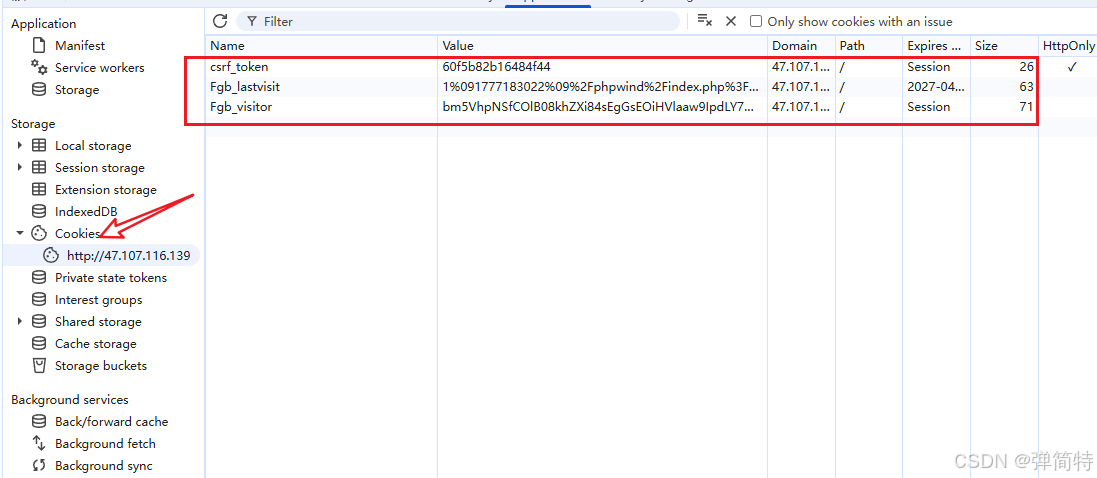 AI Visual Insight: The image shows the field structure of a Cookie in a browser or debugging tool, highlighting metadata such as Domain, Path, and expiration time in addition to Name and Value. Together, these fields determine whether the Cookie will be automatically attached to later requests.
When the server responds for the first time, it issues data through Set-Cookie. The browser stores it and automatically sends it back in the Cookie request header for subsequent requests under the same domain. That is why Cookie-based authentication works almost transparently.
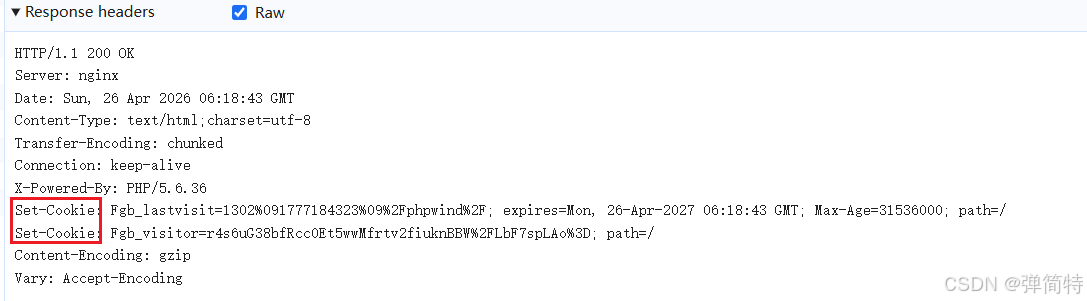 AI Visual Insight: The image shows the return format of
 Set-Cookie in the response header. It illustrates that the server does not directly validate the raw text during the request phase. Instead, it relies on the browser to return the Cookie according to domain and path rules, which enables continuous session handling.
JMeter Handles Cookies Through the HTTP Cookie Manager
By default, JMeter does not manage Cookies intelligently like a browser. You must explicitly add an HTTP Cookie Manager. It stores the Cookies returned by the server and automatically attaches them to subsequent requests within the same thread group.
Thread Group
└── HTTP Cookie Manager
    ├── Login Request
    └── Business Request
This structure means that within the same thread group, once the Cookie Manager has received the Cookie, later requests can automatically reuse the authenticated session.
Session Authentication Depends on Server-Side Session Storage
A Session is best understood as server-maintained session state. After a successful login, the server generates a SessionId, stores the real user session data in memory or Redis, and returns the SessionId to the client through a Cookie.
So while Session-based authentication looks like a server-side mechanism, its transport layer is still Cookie-based. In other words, JMeter still relies on the HTTP Cookie Manager to handle Sessions.
The Difference Between Session and Cookie Must Be Understood in Layers
A Cookie is a client-side storage mechanism. A Session is a server-side session mechanism. They often appear together, but they serve different roles: the Cookie carries the identifier, while the Session stores the actual data.
| Type | State Storage Location | Automatically Sent in Later Requests | JMeter Handling Method |
|---|---|---|---|
| Cookie | Client side | Yes | HTTP Cookie Manager |
| Session | SessionId on the client, data on the server | Yes | HTTP Cookie Manager |
| Token | Client side | No | Extract and add manually |
Token Authentication Requires the Client to Send the Token Explicitly
Tokens are common in mobile apps, decoupled front-end/back-end architectures, H5 applications, and open APIs. After login succeeds, the server returns a Token, and the client stores it manually. Every later request must include it explicitly in the URL, request headers, or the Authorization field.
The key difference here is that browsers do not send Tokens automatically, and JMeter does not either. So the fixed pattern for Token-based scripts is: extract first, then inject.
The Standard JMeter Workflow for Extracting and Injecting Tokens
First, add a JSON Extractor after the login request. Assume the response path is $.data.token, and define the variable name as mytoken. Then use ${mytoken} in subsequent requests.
# Pseudocode: represents the Token handling logic in JMeter
login_response = {
    "data": {
        "token": "eyJhbGciOiJIUzI1Ni..."
    }
}

mytoken = login_response["data"]["token"]  # Extract the token from the login response
headers = {
    "Authorization": f"Bearer {mytoken}"  # Inject the token into the standard request header
}
This code summarizes what JMeter actually does: extract the variable first, then concatenate it into the request header or request parameters.
All Three Common Token Transmission Methods Require Manual Configuration
URL Parameter Mode Fits Legacy APIs
GET /api/user/info?token=${mytoken}Use this configuration when the API requires the Token in the query string. It works for older systems, but its security is limited.
Custom Header Mode Fits Internal Systems
token: ${mytoken}This configuration means adding a custom header in the HTTP Header Manager. It is suitable for projects where the backend expects a token field.
Authorization Bearer Mode Is the Mainstream Standard
Authorization: Bearer ${mytoken}This is the recommended pattern. It works well with common authentication systems such as OAuth2 and JWT, and its semantics are clear.
Cross-Thread Group Token Sharing Is Fundamentally a Scope Isolation Problem
In JMeter, variables are visible only within the current thread group or current thread context by default. If you extract ${mytoken} in Thread Group A, Thread Group B cannot read it directly. That is the root cause of cross-thread group failures.
Also, if the test plan does not enable Run Thread Groups consecutively, multiple thread groups may execute in parallel, causing dependency order to break. First guarantee the execution order, then solve variable sharing. That is the correct path.
Using setProperty and __P to Share Global Properties Is a General Solution
The idea is to copy the variable extracted in Thread Group A into a JMeter global property, and then let Thread Group B read it.
${__setProperty(new_token,${mytoken})} // Write the thread-group variable into a global propertyThis function is typically placed in a BeanShell PostProcessor after the login request, or anywhere that supports function execution. It promotes mytoken to a globally readable property.
${__P(new_token)} // Read the token from the global propertyThis function is placed in the request parameter or request header of another thread group so it can consume the same Token across thread groups.
The Execution Chain for Cross-Thread Group Token Transfer Must Be Complete
- Thread Group A executes the login request first.
- The JSON Extractor extracts
mytoken. __setPropertywrites it intonew_token.- Thread Group B reads it through
__P(new_token). - Inject the value into a Header or URL parameter.
If you only complete step 2 and skip step 3, the variable still cannot be used across thread groups.
Cross-Thread Group Cookie Sharing Requires Both Persistence and Sharing
Cookies are more complex than Tokens because you must not only obtain the value, but also make sure requests in the target thread group actually send it. By default, each thread group has an isolated Cookie container, which you can think of as a separate browser instance.
So cross-thread group Cookie sharing must solve two problems: first, JMeter must be able to save the Cookie returned by the server; second, another thread group must be able to read and send that Cookie.
Enabling Cookie Persistence Is a Prerequisite
Modify jmeter.properties:
CookieManager.save.cookies=true # Allow JMeter to save Cookies for debugging and later processingThis configuration allows the Cookie Manager to preserve returned Cookies, making them visible in debugging samplers and preparing them for later sharing.
A Minimal Viable Approach to Cross-Thread Group Cookie Sharing
- Add an HTTP Cookie Manager to Thread Group A.
- Place a Debug Sampler after the request that returns the Cookie and verify that the Cookie has been stored in the manager.
- Add an HTTP Cookie Manager to Thread Group B.
- Use a property function to promote the key Cookie value from Thread Group A to the global scope.
- In Thread Group B, construct the corresponding Cookie key-value pair and set the proper scope.
# Pseudocode: expresses the idea of cross-thread group Cookie sharing
cookie_name = "SESSION"
cookie_value = "abc123xyz"  # Extracted Cookie value from Thread Group A

global_cookie = f"{cookie_name}={cookie_value}"  # Assemble a sendable Cookie fragment
request_headers = {
    "Cookie": global_cookie  # Explicitly attach the Cookie in the request from Thread Group B
}
This code shows that Cookie sharing must eventually become a matter of constructing and sending the Cookie. Extraction alone is not enough.
The Configuration Paths for the Three Authentication Types Are Completely Different
For Cookie and Session, the core concept is automatic return, so the main component is the HTTP Cookie Manager. For Token, the core concept is manual transmission, so the main components are the extractor and the HTTP Header Manager. For cross-thread group scenarios, the real issue is scope and container isolation, so you must bridge them with global properties or explicit Cookie construction.
In API testing, identifying the authentication type first and then designing variable scope is far more effective than blindly adding components. In performance testing, cross-thread group strategies are especially important, because login, homepage warm-up, and business requests often should not run inside the same load thread group.
FAQ
Why does authentication still fail even though I successfully extracted the Token?
The two most common reasons are: first, you injected the Token into the wrong place—for example, the API expects Authorization, but you put it in the URL; second, the extracted Token variable exists only in the current thread group, and you did not promote it to a global property with __setProperty before using it across thread groups.
Why does the Cookie still not pass through even though I added an HTTP Cookie Manager to both thread groups?
Because each thread group’s Cookie Manager is isolated by default, just like two separate browsers. Thread Group B does not automatically inherit the Cookies saved by Thread Group A. You must first enable Cookie persistence, then implement global sharing or explicitly construct the Cookie request header.
In API testing, should I prefer Cookie, Session, or Token?
This is not a tool choice. It is determined by how the target system is implemented. Traditional web monoliths and classic websites often use Cookie/Session. Mobile apps, decoupled front-end/back-end systems, and open platforms more often use Token-based authentication. During testing, always follow the API documentation and real captured traffic rather than making assumptions.
AI Readability Summary: This article systematically reconstructs JMeter practices for API authentication and cross-thread group variable sharing. It explains the differences between Cookie, Session, and Token, shows how to configure each one in JMeter, and provides executable strategies for sharing Tokens and Cookies across thread groups in both API testing and performance testing scenarios.