Kafka uses the ISR mechanism to manage replica synchronization state and address partition failover, data consistency, and cluster health evaluation. This guide focuses on three core areas: AR/ISR/OSR, Unclean Leader Election, and coordinated message size configuration. Keywords: Kafka, ISR, Leader Election.
Technical Specification Snapshot
| Parameter | Description |
|---|---|
| Tech Stack | Kafka, ZooKeeper, Java ecosystem |
| Core Topics | Replica synchronization, failover election, Broker health management |
| Protocols/Mechanisms | Producer ACK, Replica Fetch, ZooKeeper heartbeat |
| Stars | Not provided in the original article |
| Core Dependencies | Kafka Broker, Producer, Consumer, ZooKeeper |
Kafka replica set definitions determine the fault-tolerance boundary of a partition
Each Kafka partition has multiple replicas, but not all replicas are at the same health level. Understanding AR, ISR, and OSR is the foundation for understanding Kafka’s high availability and consistency strategy.
What AR, ISR, and OSR represent
AR stands for Assigned Replicas, which is the full set of replicas assigned to a partition. It is the complete set and does not distinguish current synchronization state.
ISR stands for In-Sync Replicas, which is the set of replicas that remain sufficiently synchronized with the Leader, including the Leader itself. Only replicas in the ISR are eligible to participate in a new Leader election when the current Leader fails.
OSR stands for Out-of-Sync Replicas, which is the set of replicas that have fallen behind the Leader and have been removed from the synchronized set. They still exist, but Kafka no longer treats them as reliable failover candidates.
AR = ISR + OSRThis equation summarizes the layered relationship between replica states: AR is the total set, ISR is the set of healthy synchronized replicas, and OSR is the set of lagging replicas.
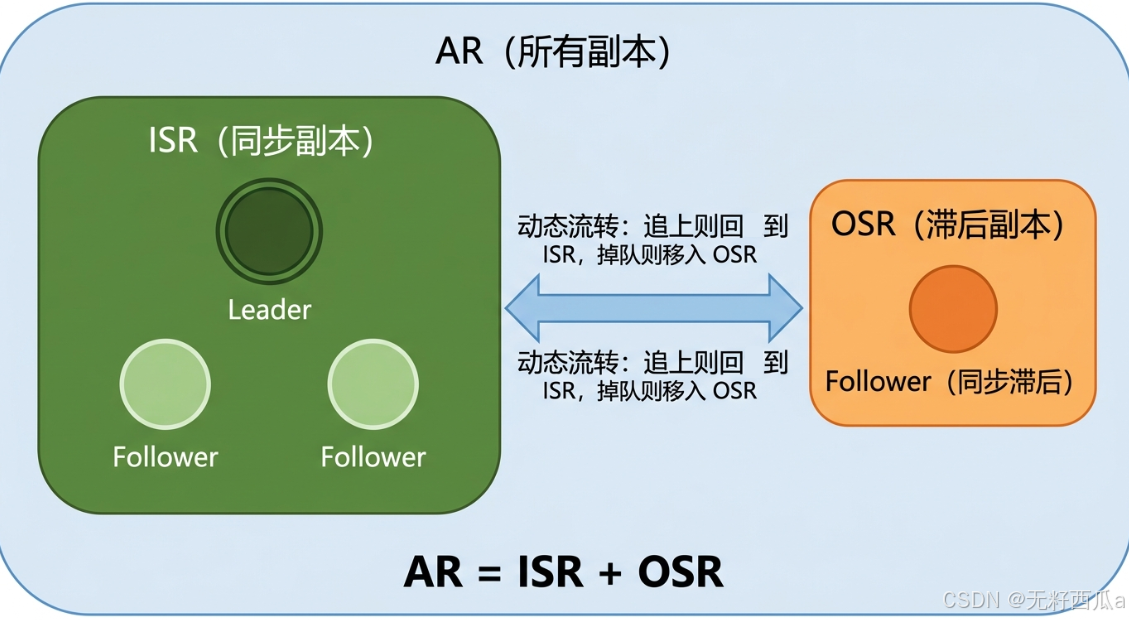 AI Visual Insight: The image illustrates the hierarchy of replica sets within a single partition. It typically centers on the Leader and highlights ISR and OSR members, making the boundaries between “all replicas,” “in-sync replicas,” and “out-of-sync replicas” easy to understand for failover analysis.
ISR shrinks and recovers dynamically rather than through static configuration
The Leader continuously maintains the ISR. If a Follower fails to stay sufficiently synchronized, Kafka removes it from the ISR. Once it catches up again, Kafka may add it back.
Synchronization timeout is the primary condition for removing a Follower from the ISR
In modern Kafka versions, replica.lag.time.max.ms is the primary setting used to determine whether a replica has fallen behind. If a Follower does not issue replication requests to the Leader for too long, or if its fetch progress remains behind for too long, Kafka removes it from the ISR.
Older versions supported replica.lag.max.messages, but this parameter has largely fallen out of use because message-count-based detection can cause false positives during sudden traffic spikes.
# Remove the Follower from the ISR if it fails to maintain effective sync within this time window
replica.lag.time.max.ms=30000
This configuration defines the time threshold for ISR shrink events and serves as the key parameter for deciding whether a replica is still keeping up.
The ACK mechanism binds ISR directly to message commit semantics
When a producer uses acks=all, the Leader treats a message as safely committed only after the ISR satisfies the commit condition. A more complete ISR provides stronger data safety, while a smaller ISR shortens the write acknowledgment path.
This means Kafka does not simply optimize for “more replicas is always better.” Instead, it balances reliability and latency.
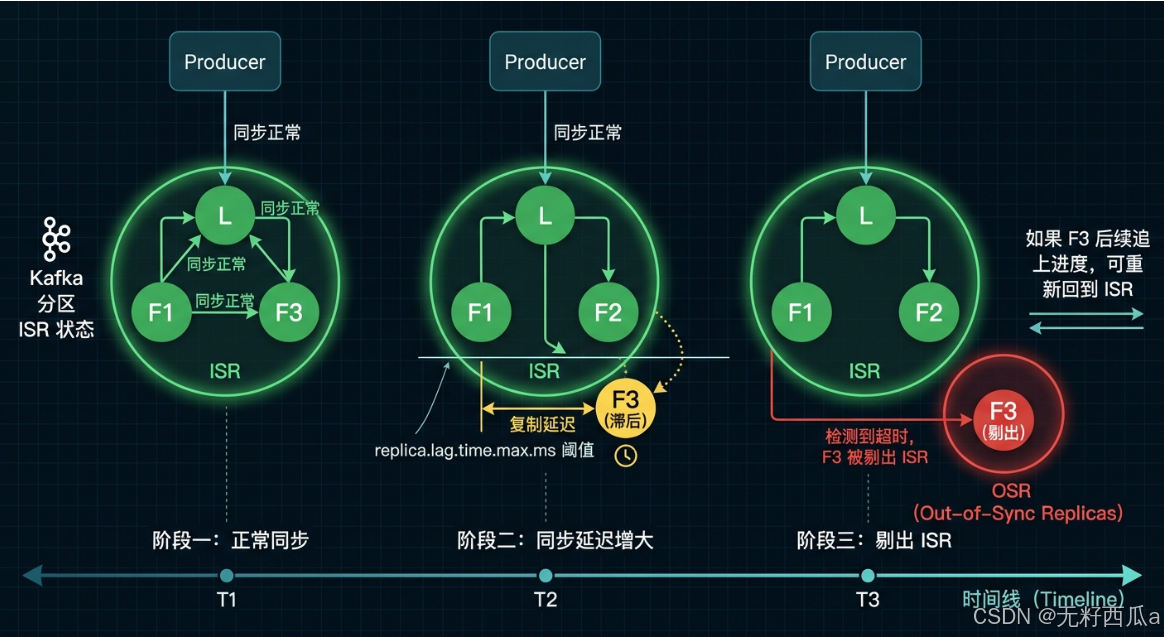 AI Visual Insight: The image emphasizes how a lagging Follower causes the ISR to shrink, the OSR to grow, and the ACK commit path to change. It helps explain why ISR shrinkage affects the reliability boundary and may change write latency and commit success behavior.
When the ISR is empty, you must choose between consistency and availability
After a Leader failure, Kafka prefers to elect a new Leader from the ISR. If the ISR is empty, the cluster enters a high-risk scenario.
unclean.leader.election.enable determines the failover election strategy
If this setting is enabled, a lagging replica in the OSR can also be promoted to Leader. The system can recover service faster, but it may lose data that the old Leader had not yet replicated.
If this setting is disabled, Kafka waits for the original Leader to recover or for a qualified replica to become available. This approach is more conservative, but the partition may remain unavailable for longer.
# Availability first: allow a non-ISR replica to become Leader, with risk of data loss
unclean.leader.election.enable=true

# Consistency first: prevent non-ISR replicas from becoming Leader
unclean.leader.election.enable=false
This configuration directly defines the bottom line for failover behavior: recover service first or preserve data consistency first.
Scenario selection should be driven by the business loss model
Use cases such as log collection, event tracking, and monitoring metrics usually prioritize availability and may tolerate a more relaxed strategy. Core transaction paths such as orders, payments, and inventory are better served by disabling non-ISR Leader election.
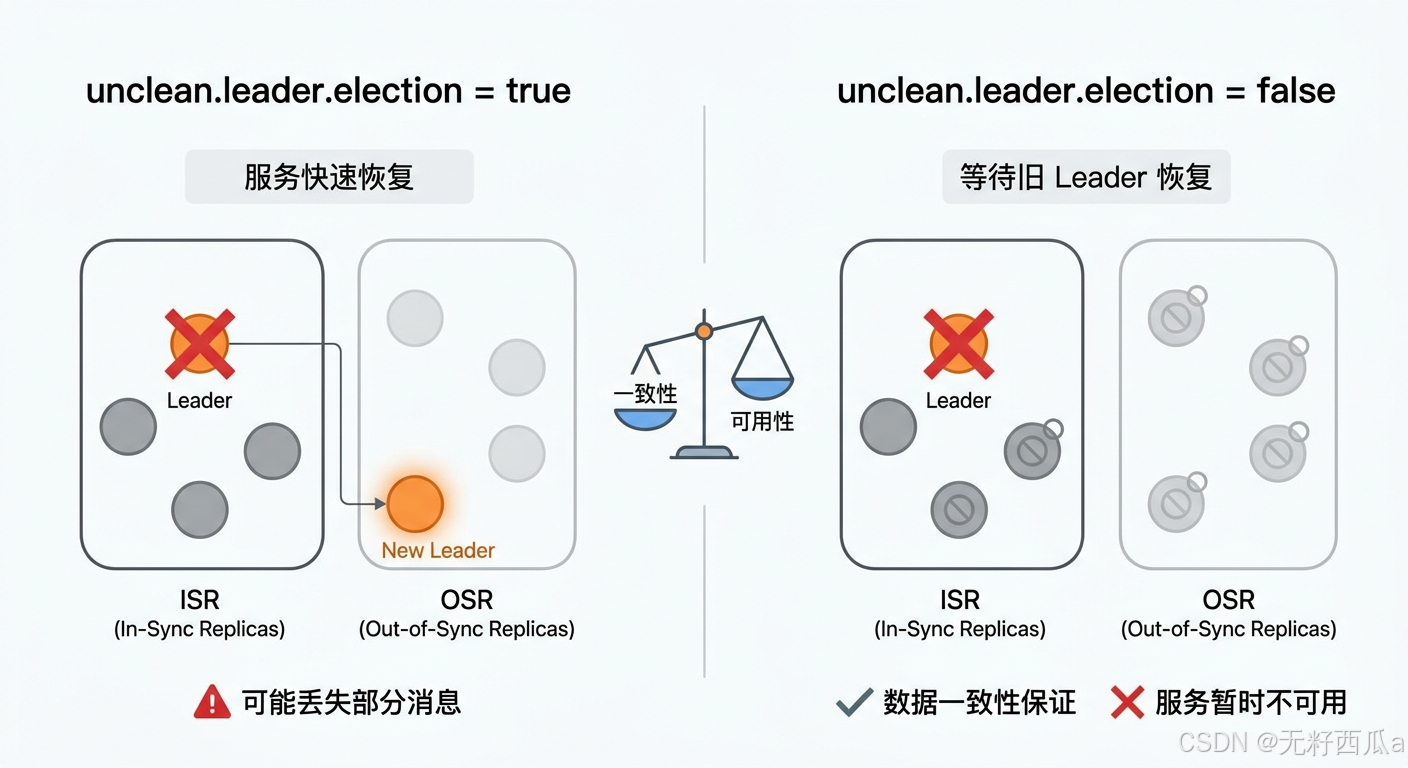 AI Visual Insight: The image typically presents two decision branches after a Leader failure: promoting a new Leader from the OSR or waiting for the old Leader to recover. It highlights the direct trade-off between data loss risk and service recovery speed.
Broker health requires both connectivity and synchronization
In Kafka, a Broker being “alive” does not necessarily mean it is “healthy.” A process may still be online, but if it cannot participate in effective replication, it still weakens partition reliability.
ZooKeeper heartbeats determine whether a Broker is disconnected
After startup, a Broker registers an ephemeral node in ZooKeeper. If the heartbeat stops, ZooKeeper deletes the ephemeral node, and the control plane marks that Broker as disconnected and triggers failure handling.
Replica synchronization determines whether a Broker can still participate in the ISR
Even if the Broker process is running normally, Kafka removes its Follower replicas from the ISR if they continue to lag. In practice, health evaluation includes at least two layers: control-plane connectivity and acceptable data replication performance.
# Example: inspect key configurations related to replica synchronization
grep -E "replica.lag.time.max.ms|unclean.leader.election.enable|message.max.bytes" server.properties
This command provides a quick first-pass review of the Broker-side high-availability settings and is useful during troubleshooting.
Kafka maximum message size must be configured consistently across the entire pipeline
By default, Kafka limits a single message to about 1 MB, roughly 1000000 bytes. This limit is not controlled by a single configuration point. It is an end-to-end constraint.
Changing only the Broker setting can create messages that consumers cannot read
If the Broker allows 2 MB messages but the Consumer fetch limit remains 1 MB, the message may be written successfully but still fail during consumption. Likewise, if the replication path is not updated, replica synchronization may also fail.
# Producer: allow a larger request payload
max.request.size=2097152

# Broker: allow a larger single message
message.max.bytes=2097152

# Broker replication: make sure replica fetch limits are large enough
replica.fetch.max.bytes=2097152

# Consumer: make sure it can fetch the message
fetch.message.max.bytes=2097152
This configuration set reflects one core principle: the message size limit must remain consistent across the Producer, Broker, Replica, and Consumer.
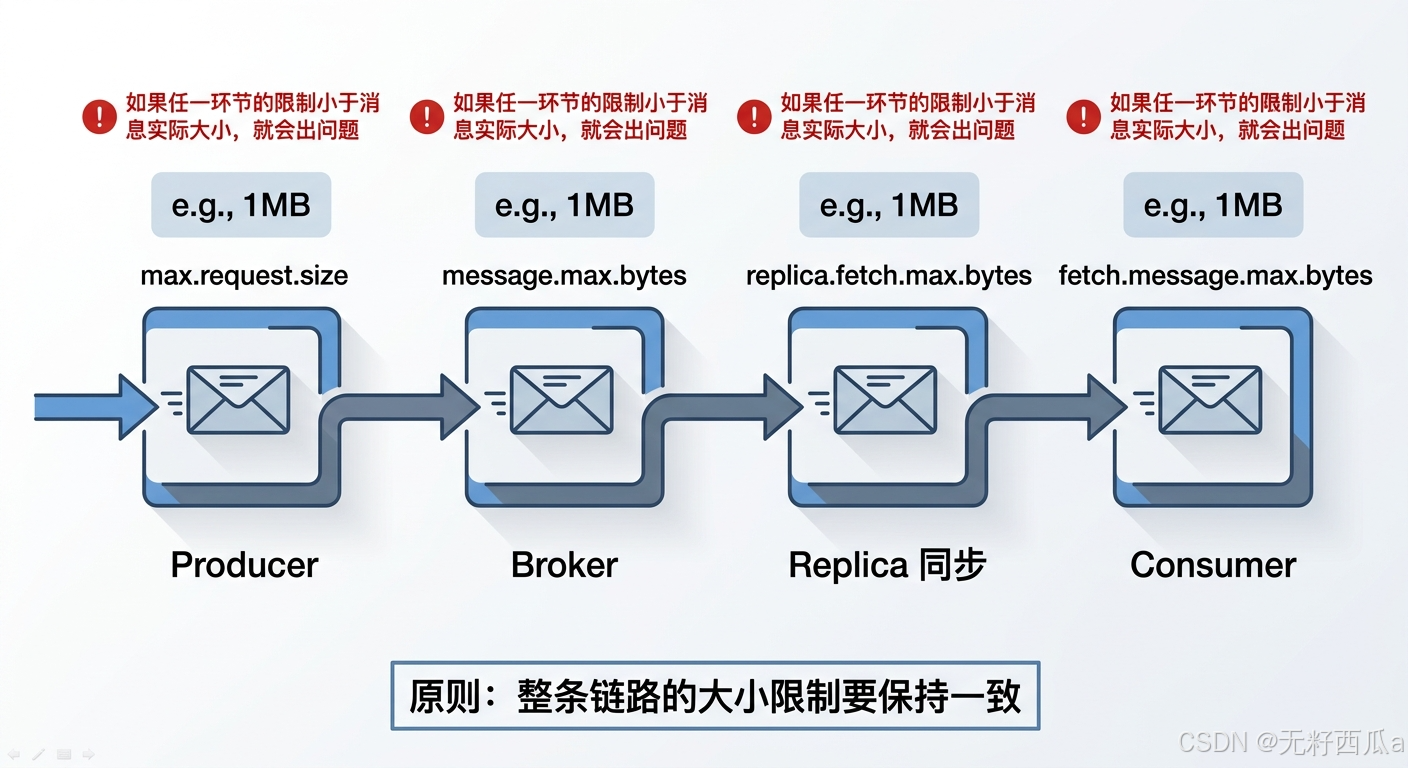 AI Visual Insight: The image shows the full path of a message from Producer to Broker, then through replica synchronization and Consumer fetch. It highlights the relationship between multiple byte-limit settings and explains why large messages often expose end-to-end configuration mismatches.
Engineering practice should prioritize ISR churn frequency over isolated failures
In real production systems, the most dangerous pattern is not a single Follower falling behind, but frequent ISR flapping. This usually indicates systemic issues with networking, disk I/O, Broker load, or large-message configuration.
You should prioritize three categories of monitoring metrics
The first category is ISR shrink and expand frequency, which helps you track replica stability. The second is Leader election count, which helps identify partition instability. The third is replica synchronization lag and request size, which helps locate the source of bottlenecks.
FAQ
Q1: Why does Kafka prefer only ISR replicas as Leader candidates?
A: Because the ISR represents the set of replicas that are sufficiently synchronized with the current Leader. Electing a Leader from this set maximizes retention of committed data and reduces the probability of rollback or data loss.
Q2: Is unclean.leader.election.enable=false always better?
A: No. It is more conservative and is a strong fit for critical transaction paths. But if your business prioritizes service continuity, the cost of temporary unavailability may be higher than the cost of limited data loss.
Q3: Why do consumers still fail after increasing message.max.bytes?
A: In most cases, the settings are not aligned across the full pipeline. In particular, fetch.message.max.bytes, replica.fetch.max.bytes, and max.request.size often also need to be increased, or one stage of write, replication, or consumption will still fail.
Core summary
This article systematically reconstructs Kafka’s replica synchronization model. It explains the relationship between AR, ISR, and OSR, then breaks down ISR shrink behavior, Leader failover election, Broker health evaluation, and coordinated message size settings to help engineers make practical trade-offs between consistency, availability, and throughput.